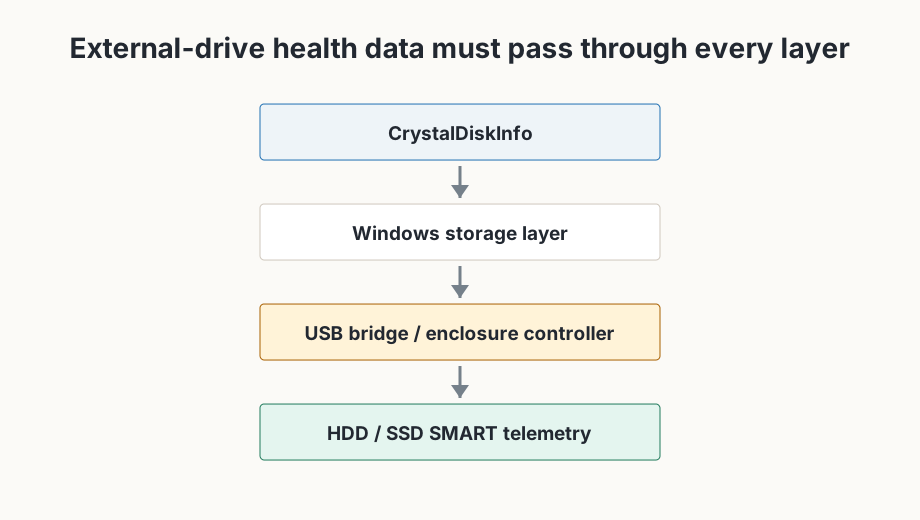
Most modern external USB HDD and SSD devices can be read, but compatibility is not guaranteed. The USB bridge or enclosure must pass the needed drive-health data through to Windows.
Three cases to separate
Case 1 - Windows does not see the drive
The issue is broader than CrystalDiskInfo. First check power, the connection, the cable, the enclosure and whether the drive appears in Windows Disk Management.
Case 2 - Windows sees the drive, but CrystalDiskInfo does not
The USB bridge, enclosure controller, S.M.A.R.T. passthrough or storage/controller layer may be relevant. Windows can read files even when health telemetry is not exposed cleanly.
Case 3 - CrystalDiskInfo sees the drive but some S.M.A.R.T. data is missing
Incomplete S.M.A.R.T. passthrough can happen depending on the enclosure, bridge or controller. Some fields may be missing even though the drive itself is visible.
Troubleshooting flow
- Windows sees drive?
- CrystalDiskInfo sees drive?
- Direct SATA/NVMe or USB?
- Check enclosure or USB bridge behavior
- Check RAID or storage layer
- Try another connection where appropriate
Where compatibility can break
Multi-drive enclosures can be problematic because the bridge may hide individual disk telemetry. Many RAID controllers present compatibility limitations. Most SATA and NVMe controllers are supported, but AMD StoreMI is unsupported.
For supported drive types and limitations, see What is CrystalDiskInfo?.